The product
One canvas for your entire outreach engine.
TurboWorkflow is the orchestrator that connects your sender, your contacts, and your campaigns — so a sales or marketing motion that used to take a dozen tools runs from one screen.
How it works
Six steps from empty canvas to a running campaign.
Draw the canvas
Start at an entry point and connect blocks — send email, pause, branch, exit. The whole sequence is visible and editable in one place.
Connect a sender
Attach your SMTP server or Gmail account via OAuth2. Add per-sender signatures, configs, and a custom sending subdomain via CNAME.
Import contacts
Upload a CSV or Excel file. Fields are auto-mapped and become merge tags you can drop straight into the email body.
Schedule & throttle
Send now, at a chosen time, or in batches with per-hour and per-day limits at randomized, human-like intervals.
Track every send
Each email gets a 1px open pixel and rewritten click links. Opens and clicks roll up into per-workflow and account-wide reporting.
Automate via API
Every UI capability is exposed programmatically. Export a workflow as JSON and import it elsewhere — nothing is locked in.
The canvas
Logic you can see — and ship.
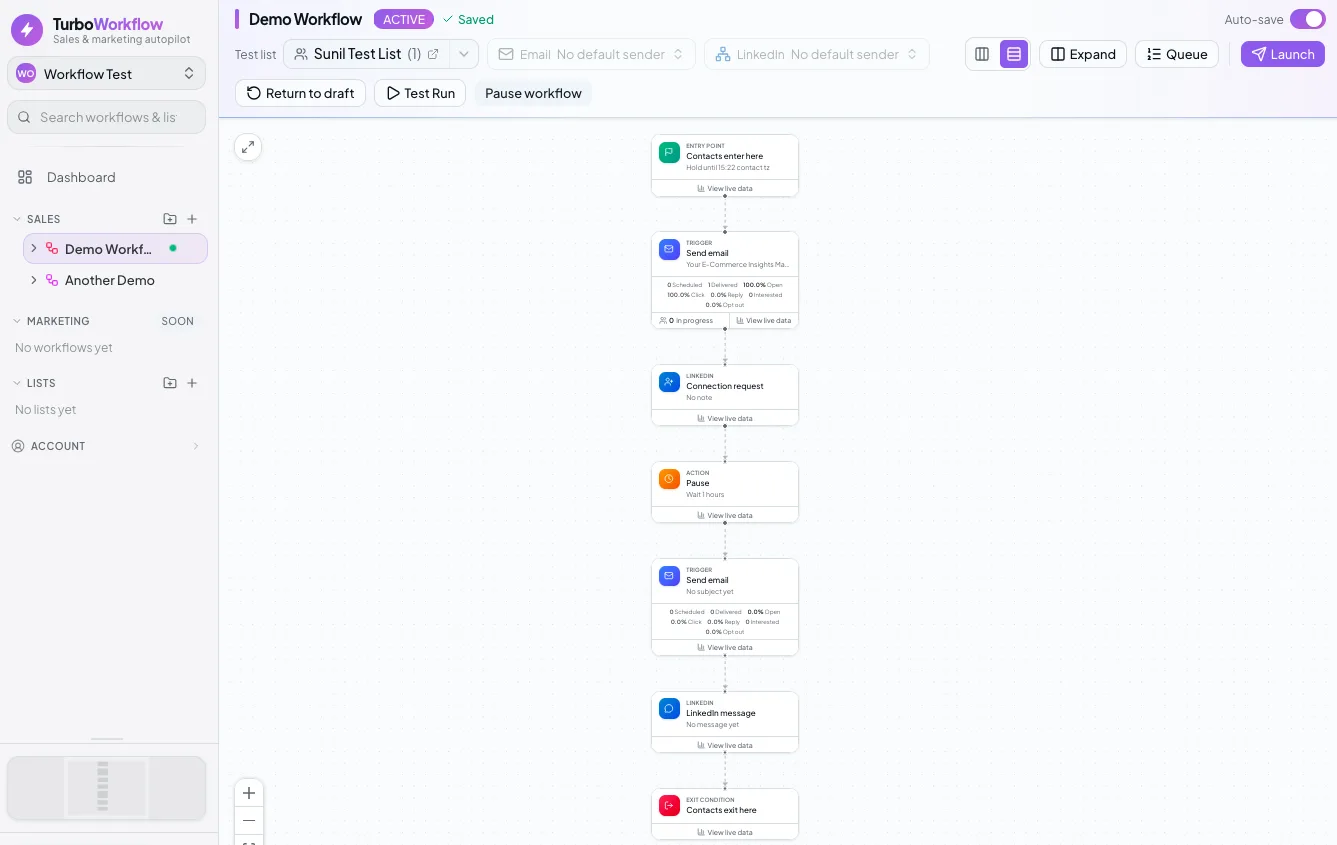
The workflow canvas is the source of truth. Connect an entry point to a trigger, drop in a pause, branch on a click, and define when contacts exit. Every node is editable, and the whole graph exports as JSON.
- Entry → send → pause → branch → exit, fully visual
- Pause durations in seconds, minutes, hours, days, or months
- Exit conditions that pull a contact out of the flow
- Export and import any workflow as portable JSON
Built for the whole motion.
Selling and marketing, organized under one Sales and one Marketing section — folders, lists, senders, and reporting all in reach.
Canvas workflow builder
Entry → trigger → action → exit. Pause in seconds or months. Branch on conditions. Define exit rules. Logic you can see and edit.
Bring-your-own sending
Custom SMTP or Gmail OAuth2. Per-sender names, signatures, and configuration. Custom subdomains attached with one CNAME record.
Contact import & mapping
CSV or Excel, auto-mapped or manually mapped. Every field becomes a merge tag available inside the email body, per contact.
Batch & rate-limited sends
Max emails per hour and per day. Randomized intervals between messages so big sends look human and protect reputation.
Open & click tracking
A tracking pixel and link tracking injected into every outgoing email, each with a tracking ID, feeding per-workflow reporting.
API & portable workflows
Everything in the UI is available over the API. Workflows export and import as JSON, so they move between accounts freely.
Tracking & reporting
Know what landed — across every sequence.
A 1-pixel open tracker and click tracking are injected into every outgoing email automatically. Each message carries a tracking ID, so opens and clicks roll up into per-workflow statistics and a dashboard that combines every sequence at a glance.
- Automatic 1px open-pixel and rewritten click links on every send
- Per-workflow statistics on sends, opens, and clicks
- Dashboard table combining every workflow into one view
- Tracking ID on each message for 1:1 attribution
Re: Your demo is ready
Hey — wanted to circle back on…
Following up on your interest
Hey — wanted to circle back on…
Re: Your demo is ready
Hey — wanted to circle back on…
See your first sequence on the canvas.
Connect a sender, import a list, and draw the flow. TurboWorkflow handles the sends, throttling, and tracking.