Why Your Cold Emails Land in Spam — The Five Real Causes
Why do cold emails go to spam? Learn how authentication, sender reputation, list quality, content, engagement and sending volume affect cold-email deliverability.
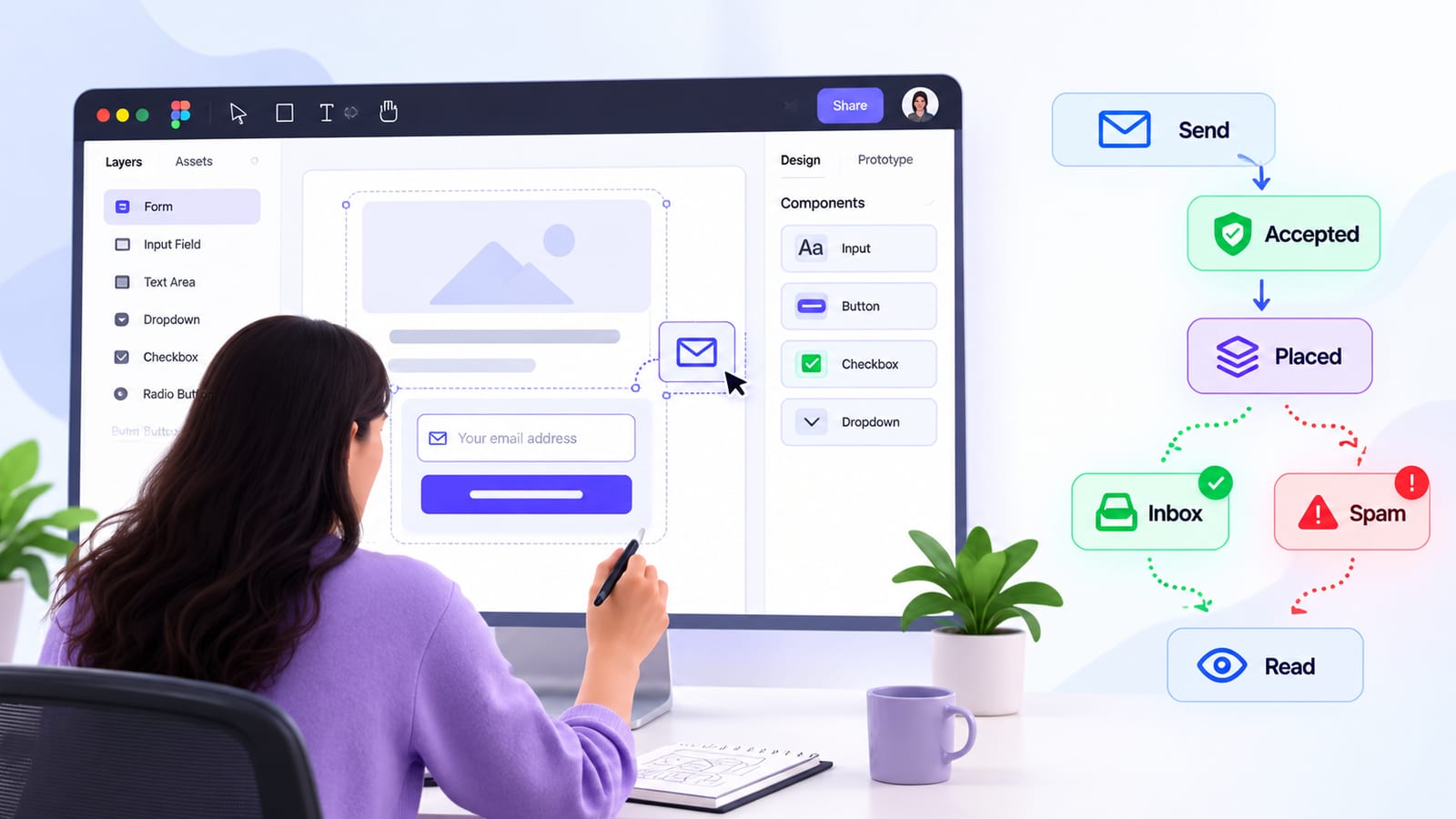
Quick answer: Cold emails go to spam when the receiving system trusts the message less than other mail. The five real causes are authentication (SPF, DKIM, DMARC and alignment), sender reputation, list quality, content and engagement, and sending volume. Diagnose in that order — and remember that “sent”, “accepted”, “placed” and “read” are four different events.
Why Do Cold Emails Go to Spam?
Cold emails go to spam when receiving systems decide that a message is less trustworthy, relevant, or expected than other mail. Authentication, sender reputation, recipient quality, content, engagement and sending behaviour can all affect how a message is handled.
The important part is understanding that sent, accepted, placed and read are four different events.
You can send an email successfully and have the receiving server accept it. That still does not guarantee that the message reaches the recipient’s inbox.
A message can be accepted and placed in spam. It can reach the inbox and never be opened. It can be opened and still receive no reply.
That is why a cold-email deliverability problem should not automatically be treated as a copywriting problem.
Before changing your subject line, find out which part of the delivery journey is actually failing.
| Event | What happens | What it proves |
|---|---|---|
| Sent | Your system attempts to send the message | Your sending system handed the message to the outbound server |
| Accepted | The recipient’s mail server accepts the message | The message was not rejected at that point |
| Placed | The receiving system puts the message somewhere | It was classified into a mailbox location such as inbox or spam |
| Read | The recipient interacts with the message | The recipient actually engaged with the message |
This distinction is the foundation for diagnosing deliverability.
How a Cold Email Is Actually Judged
When you press Send, your email does not travel directly from your application into someone’s inbox.
A simplified path looks like this:

At several points along that path, the receiving system can evaluate information about the message. That can include the sending infrastructure, authentication results, domain information, message headers, content and other signals.
The exact filtering systems and weighting of those signals vary between providers, so there is no universal rule that says one particular factor will always send an email to spam.
The Envelope and the Header
An email has more information than what the recipient sees on screen.
During SMTP delivery, the sending system uses an SMTP envelope. One important identity in that transaction is the MAIL FROM address, sometimes called the envelope sender or return-path.
The message itself also contains headers, including the visible From address that the recipient sees.
Those identities do not necessarily have to be identical. However, the relationship between them matters when authentication and DMARC alignment are evaluated.
For example:
- The visible
Fromaddress may be[email protected]. - The SMTP envelope sender may use another domain.
- DKIM may sign the message with yet another authenticated domain.
That is why simply checking whether “SPF passed” is not enough. You also need to understand which domain passed and whether the authentication result aligns with the visible From domain.
SPF: Who Is Allowed to Send?
SPF, or Sender Policy Framework, allows a domain owner to publish which servers or services are authorised to send mail using that domain’s envelope sender.
A simplified SPF record might tell receiving systems:
These are the services that are allowed to send mail for this domain.
This becomes important when a business uses multiple services, such as:
- Its own SMTP server
- A marketing platform
- A CRM
- A transactional email provider
- A customer-support platform
Adding every service to SPF without understanding how the record works can create problems.
SPF processing has a limit on DNS-query-causing mechanisms and modifiers. The commonly referenced limit is 10 DNS lookups during SPF evaluation. If the evaluation exceeds that limit, SPF can return a permanent error.
This means an SPF record should not simply grow every time another email service is added. It should be reviewed as sending infrastructure changes.
DKIM: Proving the Message Was Signed
DKIM, or DomainKeys Identified Mail, uses cryptographic signing.
The sending system signs selected parts of the email using a private key. The receiving system can retrieve the corresponding public key from DNS and use it to verify the signature.
This gives the receiving system another way to evaluate whether the message was associated with an authenticated domain and whether the signed content has been altered.
DKIM configuration commonly involves:
- A selector
- A public key published in DNS
- A private key held by the sending system
- A DKIM signature added to outgoing messages
If you change email providers, rotate keys or change selectors, verify that the DNS record and sending configuration still match.
DMARC: Connecting Authentication to the Visible From Domain
DMARC, or Domain-based Message Authentication, Reporting and Conformance, adds another important layer.
DMARC checks whether SPF and/or DKIM authentication is aligned with the domain shown in the visible From address.
For example, imagine the recipient sees:
From: [email protected]
The message might technically pass SPF using another authenticated domain. It might also pass DKIM using another domain.
That does not automatically mean DMARC will pass.
For DMARC, the relevant authenticated domain needs to align with the visible From domain according to the configured alignment mode.
This is why a system can report that SPF passed and DKIM passed while DMARC still fails.
A Simplified Delivery Path
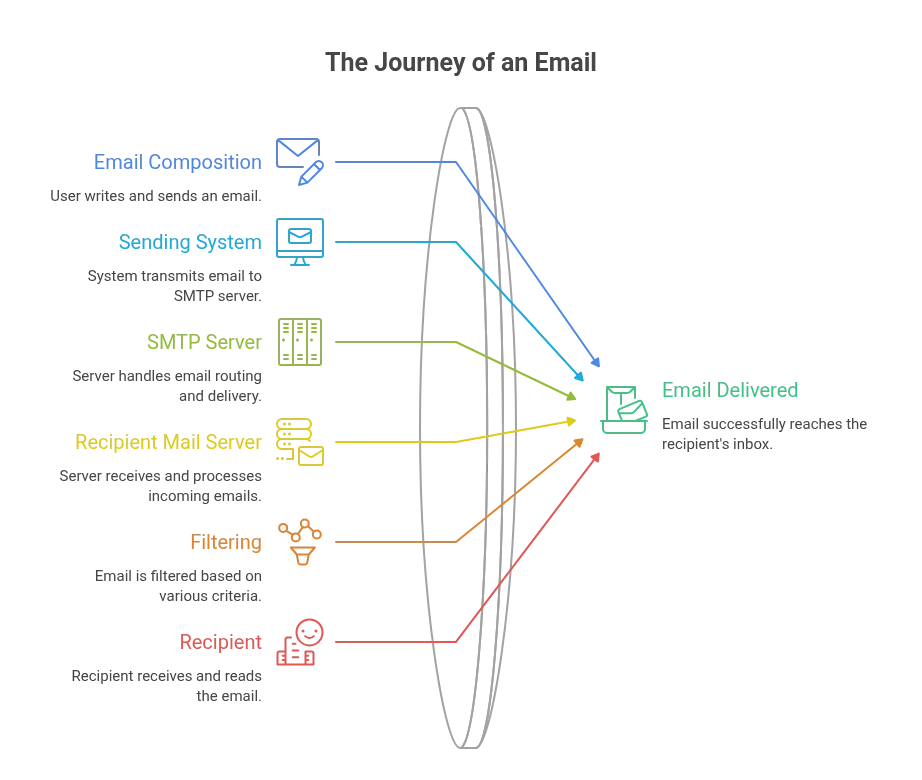
Key idea: Sending is not acceptance. Acceptance is not placement. Placement is not reading.
A useful mental model is:
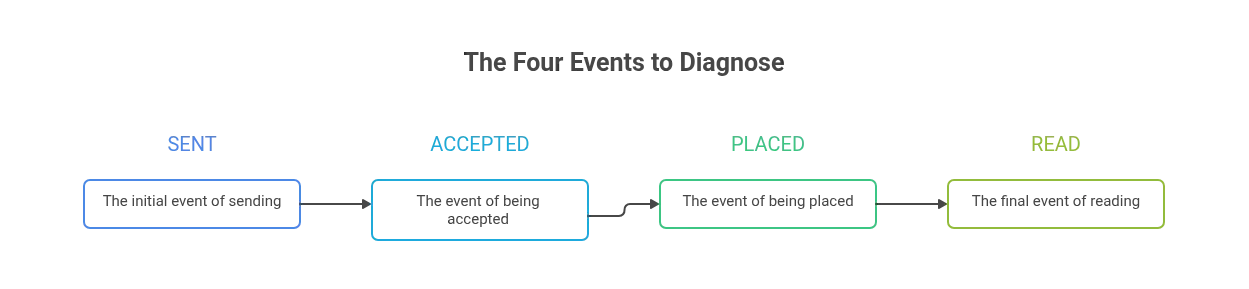
Each step tells you something different.
Cause 1: Authentication Problems
Authentication is one of the first things to check because it establishes whether your sending domain and infrastructure are properly configured.
The three terms you need to understand are SPF, DKIM and DMARC.
They solve different problems.
SPF Problems
SPF answers a basic question:
Is this server or service authorised to send mail for the domain?
Common SPF problems include:
- Missing SPF records
- Incorrect sending services
- Multiple SPF records
- Outdated services remaining in the record
- Too many DNS lookups
- Changes to infrastructure that were never reflected in DNS
For example, a company might start using a new email provider but forget to update SPF.
The new provider may then be sending mail without being properly authorised by the domain’s SPF policy.
Another common problem is adding too many services over time.
If your organisation uses several third-party providers, review the complete SPF evaluation instead of assuming that adding another include: statement is harmless.
DKIM Problems
DKIM failures can happen when:
- The DNS public key is missing
- The selector is incorrect
- The provider is signing with a different selector
- Keys were rotated incorrectly
- The sending platform is not actually signing messages
- DNS changes have not propagated correctly
The important test is not whether you created a DKIM record months ago.
The important question is:
Are the messages you are sending today actually being signed and successfully verified?
DMARC Problems
DMARC problems often come from misunderstanding alignment.
You can have:
- SPF = pass
- DKIM = pass
- DMARC = fail
That is possible when the authenticated domains do not align correctly with the visible From domain.
For example, if your customer sees From: [email protected], check that the authentication domains are aligned according to your DMARC policy.
Pay Attention to Subdomains
Do not assume that every sending domain is configured identically.
You might have:
example.commail.example.commarketing.example.comnotifications.example.com
Different services may use different subdomains or authentication configurations.
When troubleshooting, document which domain is used for:
- Visible From
- Envelope sender
- DKIM signing
- Tracking links
- Sending infrastructure
DMARC Reports Can Help
DMARC reporting can reveal useful information about authentication activity.
Reports can help identify:
- Unknown sending sources
- Authentication failures
- Unexpected infrastructure
- Misconfigured third-party services
- Legitimate services that are not aligned correctly
The goal is not simply to have an impressive-looking DNS configuration.
The goal is to make sure the messages actually being sent match the configuration you intended.
The Check
Send a test email to a controlled mailbox and inspect the authentication results.
Confirm:
- SPF passes
- DKIM passes
- DMARC passes where configured
- Authentication domains align correctly
- The DKIM selector is correct
- SPF lookup usage is within limits
- All legitimate sending services are accounted for
Fix authentication issues before changing your copy.
Cause 2: Sender Reputation
Authentication answers:
“Are you authorised to send this?”
Reputation asks:
“What history does this sender have?”
These are different questions.
A domain can have technically correct SPF, DKIM and DMARC records and still experience poor inbox placement.
Receiving systems can evaluate historical signals associated with sending infrastructure and domains.
These signals can include patterns such as:
- Complaints
- Bounce behaviour
- Sending volume
- Recipient interaction
- Historical sending behaviour
- Changes in infrastructure
- Domain history
The exact signals and their weighting vary between providers.
Domain Reputation and IP Reputation
Reputation can be associated with both domains and sending infrastructure.
If you send through a shared IP or shared infrastructure, activity from other users can also matter to the broader infrastructure reputation.
A dedicated IP gives you more control over that IP’s activity, but it does not automatically create a good reputation.
A dedicated IP sending unwanted mail can still develop poor reputation.
New Domains Have Little History
A new sending domain does not have years of positive sending history behind it.
That does not mean a new domain must fail.
It means you should avoid treating a new domain as if it already had an established reputation.
A sudden jump from almost no activity to a large outbound campaign can create a very different sending pattern from a domain that has gradually established normal mail activity.
Spam Complaints Matter
A recipient ignoring your email is not the same as a recipient actively reporting it as spam.
Complaints are a stronger negative signal because they explicitly tell the mailbox provider that the recipient considers the message unwanted.
That is why list quality and targeting matter even when bounce rates look acceptable.
Reputation Recovery Takes Time
If reputation has already deteriorated, sending even more mail does not necessarily solve the problem.
A better approach is to identify what changed.
Look for:
- A recent volume increase
- A new sending domain
- A new IP or provider
- Increased complaints
- Poor list quality
- Increased bounces
- A new campaign or audience
- Changes in tracking infrastructure
Then reduce the problematic behaviour and maintain better sending practices consistently.
The Check
Review available reputation information for your domain and sending infrastructure.
Compare it with:
- Complaint activity
- Bounce activity
- Sending volume
- Recent infrastructure changes
- New domains or mailboxes
- Major campaign changes
Do not assume that authentication alone explains inbox placement.
Cause 3: Poor List Quality
You can have correct authentication and still have poor deliverability if the recipient list is unhealthy.
This is one of the most common areas to investigate because a sending system cannot compensate for a list full of invalid, abandoned or problematic addresses.
Old or Recycled Addresses
Email databases age.
People change jobs. Companies close. Addresses become inactive. Old contacts can become invalid or eventually be repurposed.
A list that performed well several years ago may not perform the same way today.
Spam Traps
Spam traps are addresses that can be used by mailbox providers or anti-abuse organisations to identify problematic sending behaviour.
Sending to these addresses can create serious reputation problems.
This is one reason buying or collecting large quantities of questionable contacts can be risky.
Hard Bounces
A hard bounce generally indicates a permanent delivery problem.
Examples can include:
- Invalid recipient address
- Non-existent domain
- Permanently rejected mailbox
Hard-bounced recipients should normally be suppressed rather than repeatedly retried.
Continuing to send to known invalid addresses provides no benefit and can create unnecessary negative signals.
Soft Bounces
Soft bounces are different.
A temporary failure can occur because of:
- Temporary mailbox issues
- Rate limiting
- Temporary server problems
- Mailbox capacity
- Temporary policy restrictions
One temporary failure does not automatically mean the address should be deleted.
However, repeated failures should be investigated and handled according to your suppression rules.
Suppression Discipline
A healthy sending system should maintain suppression for recipients who should not receive additional messages.
This can include:
- Hard bounces
- Unsubscribed recipients
- Repeatedly failing addresses
- Spam complaints
- Other explicitly suppressed contacts
If a recipient opts out and later reappears in another campaign, the problem is no longer just a deliverability issue. It is a data and suppression-control issue.
The Check
Take a sample of recent bounce and suppression events.
Separate:
- Hard bounces
- Soft bounces
- Repeated failures
- Invalid addresses
- Complaints
- Suppressed recipients
Then verify that permanent failures and opt-outs cannot accidentally re-enter future campaigns.
Cause 4: Content and Engagement
Many cold-email guides reduce spam filtering to a list of “spam words.”
That is too simplistic.
Content can matter, but modern filtering is not simply a keyword scanner that sees one suspicious word and immediately moves the message to spam.
The broader context of the message matters.
Links Matter
Links can influence how a message is evaluated.
Look at:
- The destination domain
- The number of links
- Redirects
- Tracking domains
- The relationship between the visible text and destination
- Whether the destination looks trustworthy
- Whether the link structure changes between campaigns
A short email with one clear destination is structurally different from an email containing many tracking links, multiple redirects and several unrelated domains.
Tracking Domains Matter Too
Marketing systems often use tracking domains for:
- Link tracking
- Click tracking
- Open tracking
- Redirects
That can create an additional domain relationship that receiving systems may evaluate.
If deliverability changes immediately after changing tracking infrastructure, include that change in your investigation.
Image-Heavy Emails
Images are not automatically bad.
But a message that relies heavily on images can behave differently from a simple text-oriented email.
Consider:
- Image-to-text balance
- Image hosting
- Alt text
- Tracking pixels
- External resources
- Whether the message still makes sense if images are blocked
For cold outreach, simplicity can also make troubleshooting easier because there are fewer moving parts.
Engagement Is More Useful Than Keyword Obsession
If recipients consistently ignore, delete or complain about your messages, changing one phrase in the subject line is unlikely to solve the underlying problem.
A better question is:
Are the people receiving this message likely to find it relevant?
That brings list quality, targeting and offer quality back into the deliverability discussion.
The Check
Run a controlled test and review:
- Links
- Destination domains
- Redirects
- Tracking domains
- Image usage
- Text-to-image balance
- Authentication headers
- Inbox versus spam placement
Do not change ten things at once. If you change authentication, content, volume and the list simultaneously, you make the result much harder to interpret.
Cause 5: Sending Volume and Sending Patterns
Sending volume matters, but the shape of that volume matters too.
There is a meaningful difference between a gradual, consistent increase and a sudden batch.
For example:

The chart is not a universal warm-up formula. It simply illustrates the difference between gradual growth and a sudden spike.
Sudden Volume Increases
A mailbox that normally sends a small number of messages and suddenly sends a much larger batch has changed its behaviour.
That change should be treated as something to investigate.
Ask:
- Did the campaign size increase?
- Did several campaigns launch at once?
- Did a new mailbox start sending?
- Did the same audience get contacted repeatedly?
- Did a new automation begin?
- Did a backlog suddenly get released?
Domain Warm-Up Is Not a Magic Number
There is no universal “send exactly X emails per day” rule that guarantees inbox placement.
A domain warm-up schedule should be treated as a controlled increase in sending activity, not a magic formula.
The appropriate pace depends on factors such as:
- Existing sending history
- Domain age and history
- Mailbox configuration
- Recipient quality
- Infrastructure
- Sending consistency
- Recipient responses
The goal is to avoid unnecessary, abrupt changes in behaviour.
Per-Mailbox Limits
If your sending platform applies a sending cap to a sending account or mailbox, that limit follows the mailbox rather than a single campaign.
For example, if one mailbox is used across multiple campaigns, the combined activity from those campaigns contributes to the mailbox’s overall sending volume.
This matters because looking at each campaign separately can hide the real sending pattern.
A mailbox may appear to send a reasonable amount in Campaign A and a reasonable amount in Campaign B, while the combined volume creates a much larger daily load.
Rotation Does Not Automatically Solve Volume Problems
Adding multiple mailboxes can distribute activity, but it does not automatically make a high-volume strategy safe.
If several mailboxes all create large bursts at the same time, the overall sending behaviour can still be aggressive.
The Check
Review:
- Per-mailbox volume over time
- Sudden increases
- Hourly or daily bursts
- Campaign concentration
- Multiple campaigns using the same mailbox
- New mailboxes entering rotation
Ask a simple question:
What changed in sending behaviour immediately before deliverability declined?
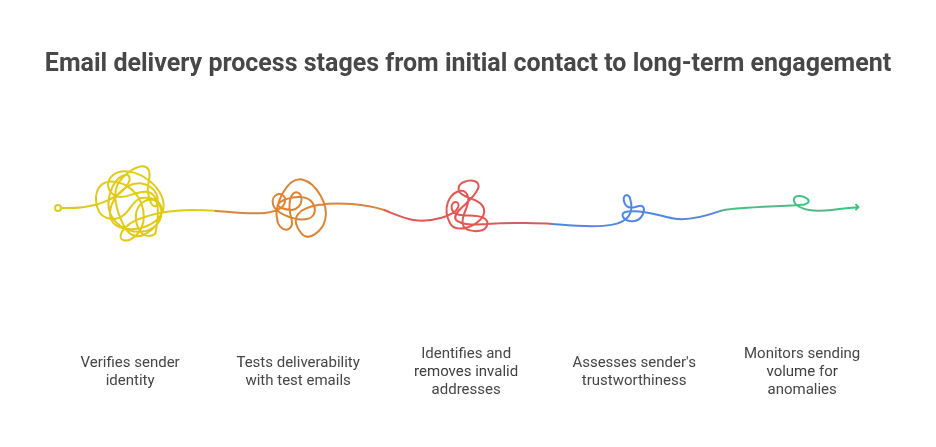
A Practical Diagnostic Sequence
When cold emails start landing in spam, avoid changing everything at once.
Use a structured sequence:
1. Check Authentication
Verify:
- SPF
- DKIM
- DMARC
- Alignment
- Sending domains
- Selectors
- DNS configuration
Fix technical authentication problems first.
2. Run a Seed Test
Send controlled messages to mailboxes you can inspect.
Record whether each message was:
- Rejected
- Accepted
- Delivered to inbox
- Delivered to spam
- Quarantined
- Otherwise filtered
This gives you a placement signal that a normal delivery report cannot provide.
3. Audit Bounces
Separate:
- Hard bounces
- Soft bounces
- Repeated failures
- Suppressed recipients
- Complaints
A high-level delivery percentage can hide important details.
For example, a campaign might report strong delivery while a smaller group of recipients generates repeated failures.
4. Check Reputation
Review available information about:
- Sending domain
- Sending IP
- Complaint activity
- Bounce activity
- Recent infrastructure changes
Look for changes that appeared around the same time as the deliverability decline.
5. Review Volume
Look at the actual sending pattern rather than only the campaign’s total number.
Check:
- Messages per mailbox
- Messages per hour
- Messages per day
- Bursts
- Multiple campaigns sharing a mailbox
- Sudden increases
Five-Minute Diagnostic Flow
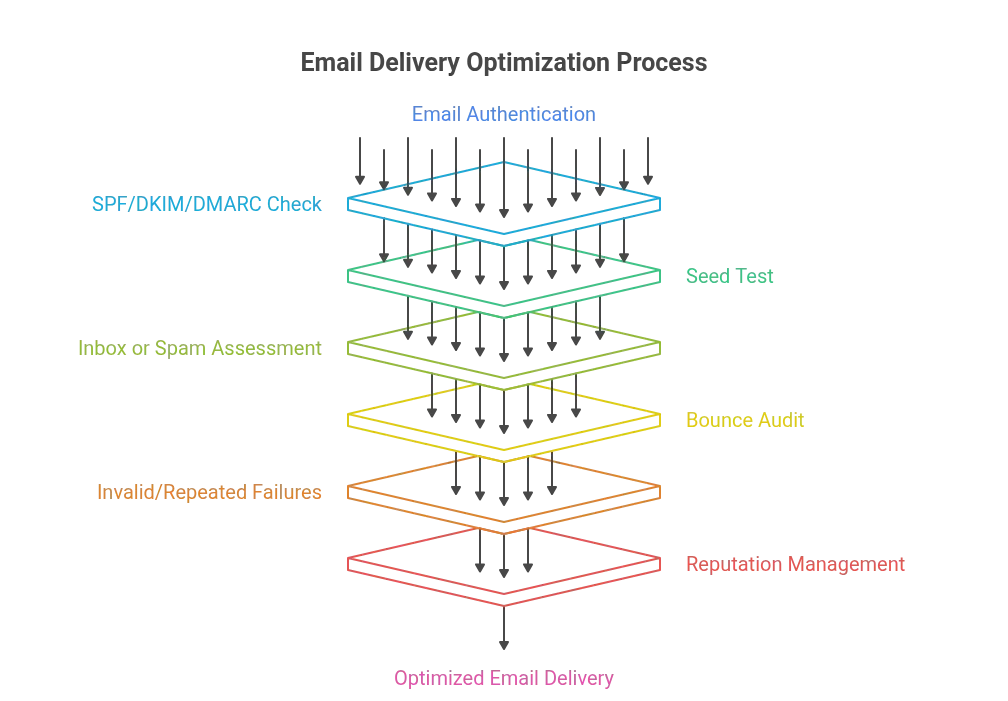
This sequence helps prevent a common mistake: changing email copy before proving that copy is the problem.
What to Do If Your Reputation Has Already Been Damaged
If your emails are already landing in spam, sending more emails is not automatically the answer.
The first step is to reduce the pressure on the sending system while you identify the cause.
A practical recovery process is:
- Review authentication.
- Reduce or pause problematic sending behaviour.
- Clean invalid and questionable contacts.
- Confirm hard bounces are suppressed.
- Confirm unsubscribed recipients remain suppressed.
- Review complaint activity.
- Review recent infrastructure or domain changes.
- Check seed-mailbox placement.
- Reintroduce sending gradually.
- Monitor the results over time.
There is no universal recovery schedule that applies to every sender.
Recovery depends on:
- What caused the problem
- How severe it became
- Which domains or IPs are involved
- How recipient behaviour changes
- Whether the underlying issue has actually been fixed
Do not expect a one-day reset just because you reduced volume for 24 hours.
Reputation is built from ongoing behaviour.
Recovery is therefore a rebuild, not simply a pause button.
What Your Email Platform Can and Cannot Tell You
Your email platform can usually tell you important things about the sending process.
Depending on the platform and configuration, you may be able to see:
- Sent messages
- Accepted messages
- Bounces
- Campaign activity
- Replies
- Opens
- Clicks
- Other event data
But there is an important limitation:
No sending platform can reliably tell you which mailbox folder every accepted email landed in.
An email can be accepted by the recipient’s mail server and still end up in spam.
That is why seed testing remains useful.
For example:
Dashboard: Delivered
Controlled mailbox: Spam
That result tells you much more than the word “delivered” alone.
It means the receiving system accepted the message, but the placement outcome was not inbox.
Your Sending Infrastructure Matters
If you send through your own SMTP or ESP configuration, the reputation associated with that sending setup is not simply a reputation owned by the email platform you use to manage campaigns.
The actual sending infrastructure, domains, recipients and behaviour all matter.
A platform can provide tools and reporting, but it cannot magically transfer a good sender reputation to every mailbox using it.
One Habit That Makes Deliverability Troubleshooting Easier
When a campaign underperforms, check the folder, not just the dashboard.
Suppose a dashboard says:
94% delivered
That number alone does not prove that 94% of the messages reached the inbox.
If the messages were rejected, investigate the technical delivery path.
If they were accepted but placed in spam, investigate:
- Authentication
- Reputation
- List quality
- Content
- Links
- Tracking
- Sending volume
- Recipient signals
If they reached the inbox but received few replies, deliverability may not be the main problem.
The issue may instead involve:
- Relevance
- Targeting
- Offer
- Timing
- Message quality
- Recipient intent
This is why these four events should remain separate:
Sent → Accepted → Placed → Read
And there is another event after reading:
Replied
A message can succeed at one stage and fail at the next.
Cold Email Deliverability Checklist
Use this checklist when troubleshooting a campaign.
Authentication
- SPF is correctly configured.
- SPF stays within the DNS lookup limit.
- DKIM signing is enabled.
- DKIM selectors and keys are current.
- DMARC is configured where required.
- SPF/DKIM authentication aligns with the visible From domain.
- All sending domains and subdomains are documented.
- Legitimate third-party sending services are included correctly.
List Quality
- Hard bounces are suppressed.
- Repeated failures are investigated.
- Invalid addresses are removed or suppressed.
- Unsubscribed recipients remain suppressed.
- Spam complaints are monitored.
- Old or questionable contacts are reviewed.
- Suppression rules apply across campaigns.
Content
- Links point to expected destinations.
- Redirects are understood.
- Tracking domains are reviewed.
- Image usage is reasonable.
- The message still makes sense if images are blocked.
- Content is relevant to the recipient.
- You are not relying on simplistic “spam word” rules.
Sending Behaviour
- Per-mailbox volume is monitored.
- Sudden volume spikes are avoided.
- Multiple campaigns using the same mailbox are counted together.
- New mailboxes are introduced gradually.
- Sending patterns remain consistent.
- Recovery is treated as a long-term process.
Testing
- Seed tests are performed.
- Inbox placement is checked separately from delivery.
- Authentication headers are inspected.
- Bounce types are reviewed separately.
- Reputation information is reviewed.
- Changes are tested in a controlled way.
Measurement
- Sent is measured separately.
- Accepted is measured separately.
- Placement is measured separately where possible.
- Reads/opens are treated as engagement signals, not delivery proof.
- Replies are measured separately from opens.
Frequently Asked Questions
Why do cold emails go to spam?
Cold emails can land in spam because receiving systems evaluate multiple signals, including authentication, sender reputation, recipient quality, content, links, engagement and sending behaviour.
There is rarely one universal cause.
Start by determining whether the messages are being rejected, accepted but filtered, or reaching the inbox without generating engagement.
Why does my email say delivered but not inbox?
“Delivered” generally means the message was accepted by the receiving system or reached the delivery stage tracked by your sending platform.
It does not necessarily mean the message was placed in the recipient’s inbox.
A message can be accepted and then classified into spam or another filtered location.
Use controlled seed tests to check actual mailbox placement.
Can SPF, DKIM and DMARC pass and the email still go to spam?
Yes.
Authentication establishes that the sending infrastructure and domain identities are properly authenticated.
It does not guarantee inbox placement.
A message can pass authentication and still be affected by reputation, recipient signals, content, links, volume or other filtering decisions.
How long should a domain warm-up schedule take?
There is no single warm-up schedule that guarantees inbox placement.
A warm-up should generally involve a gradual and controlled increase in sending activity rather than a sudden jump.
The appropriate pace depends on the domain’s history, sending infrastructure, recipient quality, volume and behaviour.
The important principle is consistency and controlled growth, not a magic daily number.
Should I send more emails if my reply rate is low?
Not automatically.
First determine whether the problem is deliverability or message performance.
If messages are being rejected or sent to spam, increasing volume can increase the problem.
If messages are reaching the inbox but recipients are not responding, investigate targeting, relevance, offer, timing and message quality.
What is the best way to check cold-email deliverability?
Use several checks together:
- Verify SPF, DKIM and DMARC.
- Send controlled seed emails.
- Inspect inbox versus spam placement.
- Audit hard and soft bounces.
- Review complaint and reputation information.
- Review per-mailbox sending volume.
- Compare what changed before deliverability declined.
No single dashboard metric tells the complete story.
Final Thought
Cold-email deliverability is not a single metric.
A “sent” email is not necessarily an accepted email.
An accepted email is not necessarily an inbox email.
An inbox email is not necessarily a read email.
And a read email is not necessarily a replied-to email.
When you separate those four events, diagnosing deliverability becomes much easier.
So the next time your dashboard tells you that your emails were delivered, do not stop there.
Check the folder, not just the report.
That is where the real deliverability story begins.